Securing your WordPress login is one of the most important steps to protect your website from unauthorized access and cyber attacks. The default WordPress login system uses predictable URLs like /wp-admin and /wp-login.php, making it easy for attackers to find and target your login page. Because these endpoints are publicly known, they are constantly attacked using brute force, credential stuffing, and automated login attempts.
If you don’t secure your WordPress login properly, your site becomes an easy target for hackers. Even strong passwords can be compromised when attackers repeatedly try thousands of login combinations. That’s why it is essential to secure WordPress login access and reduce exposure to these common attack methods.
In this guide, you’ll learn how to secure WordPress login manually without using any plugins. We will walk through simple and effective techniques to protect your admin panel, limit login attempts, and improve overall WordPress security. These steps are beginner-friendly and suitable for both personal blogs and business websites.
Why the Default WordPress Login URL is Vulnerable?
By default, every WordPress website uses common login paths like /wp-admin or /wp-login.php. These URLs are publicly known, which makes them an easy target for attackers. Since there is no obscurity or restriction by default, bots can continuously scan the internet and instantly identify WordPress login pages.
Attackers take advantage of this by launching automated brute-force attacks, where thousands of username and password combinations are tested within minutes. They also use credential stuffing, which involves using leaked usernames and passwords from previous data breaches to gain access. If your site uses weak credentials or reused passwords, the risk becomes even higher.
This is why the WordPress login page is one of the most targeted entry points in any website. Without proper protection, attackers don’t need to exploit complex vulnerabilities—they simply try to log in repeatedly until they succeed.
If you don’t secure your WordPress login, the consequences can be severe. Once an attacker gains access, they can:
- Inject malware or backdoors (web shells)
- Steal sensitive user or admin data
- Redirect your visitors to malicious websites
- Modify or delete your website content
- Take full control of your WordPress site
In many cases, compromised login access leads to long-term damage, including SEO penalties, blacklisting by search engines, and loss of user trust.
Change WordPress Login URL Without Any Plugin
One of the most effective ways to secure WordPress login access is to change the default login URL. By default, WordPress uses publicly known paths like /wp-login.php and /wp-admin, which are constantly targeted by bots and automated attacks. Replacing these with a custom login slug makes it significantly harder for attackers to find your login page.
When you change the login URL, you reduce unnecessary exposure and block a large percentage of automated brute-force attempts. Most bots rely on default paths, so simply hiding or modifying the login endpoint can immediately improve your WordPress security.
Although changing the login URL does not completely secure your website, it is a strong first step to secure WordPress login access without using any plugins.
Step 1: Choose Your Secret Slug
The first step to secure WordPress login is selecting a custom login URL slug that is difficult to guess. Avoid using common names like /login, /admin, or /dashboard, as attackers often try these variations. A strong slug reduces the chances of automated bots discovering your login page and helps protect against brute-force attacks.
Step 2: Create a Custom Login Page
Next, you need to create a page that will act as your new login entry point.
- Go to your WordPress Dashboard
- Navigate to Pages > Add New
- Create a new page with your chosen slug
For example, if your slug is secure-login, your new login URL will be: https://wpauditor.app/secure-login/ You don’t need to add any content to this page. It will simply act as a trigger for your custom login logic.
Step 3: Add the Code to functions.php
Now you need to modify your theme’s functions.php file to redirect and protect the default login URLs. Go to your theme folder and open /wp-content/themes/your-theme/functions.php and Paste this at the bottom:
// Custom login URL: yourdomain.com/secure-login

$secret_slug = 'secure-login';

add_action('init', function() use ($secret_slug) {

    $request = isset($_SERVER['REQUEST_URI'])
        ? strtok($_SERVER['REQUEST_URI'], '?')
        : '';

    $is_wp_login = strpos($request, 'wp-login.php') !== false;
    $is_wp_admin = strpos($request, 'wp-admin') !== false;
    $has_secret  = strpos($_SERVER['REQUEST_URI'], '/' . $secret_slug) !== false;

    if (is_user_logged_in()) return;

    if (($is_wp_login || $is_wp_admin) && !$has_secret) {
        wp_redirect(home_url('/404'));
        exit;
    }

    if ($has_secret) {
        require_once ABSPATH . 'wp-login.php';
        exit;
    }

});

add_filter('logout_redirect', function() use ($secret_slug) {
    return home_url('/' . $secret_slug);
});

add_filter('lostpassword_url', function() use ($secret_slug) {
    return home_url('/' . $secret_slug . '?action=lostpassword');
}, 10, 0);
Step 4: Test the New Login URL
Log out of WordPress and visit your new custom login URL.
For example: https://yourdomain.com/secure-login
The default login paths like /wp-login.php and /wp-admin should now redirect away for logged-out users.
Important Note
This method helps reduce basic bot attacks by hiding the default login path but it is not a complete security solution. You should still use a strong password, limit failed login attempts and monitor suspicious activity.
Secure WordPress Login Without the Complexity
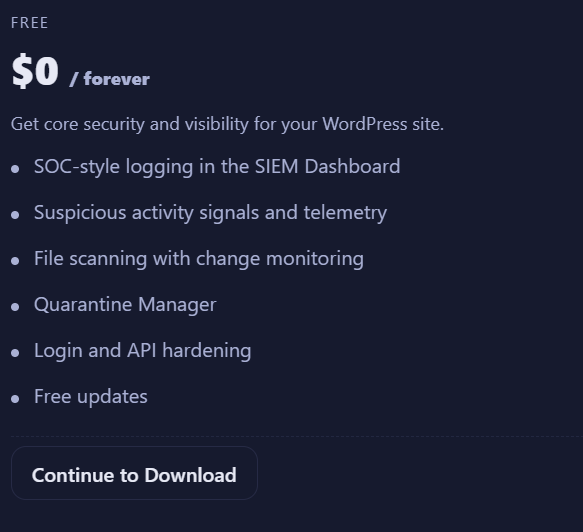
Manual methods to secure WordPress login can work, but they are time-consuming and difficult to maintain. A smarter approach is using a dedicated solution like WPAuditor.
WPAuditor is a modern WordPress security plugin built for real-time monitoring, attack detection, and active defense.
- Real-time brute-force attack detection
- Login activity monitoring and threat tracking
- Automatic IP blocking and rate limiting
- File integrity checking and malware scanning
- SIEM-style event logs and security insights
- Custom login protection and access control
- Active Defense System for automated response
Instead of managing complex manual setups, WPAuditor gives you full visibility and control over your WordPress security in one place.